Winter Look Boys Photo Prompts: Winter is one of the best seasons to upgrade your social media profile with stylish, cozy, and eye-catching photos. With advanced AI tools like Gemini AI, ChatGPT-assisted prompts, and the powerful Nano Banana AI model, creating ultra-realistic winter photos has become easier than ever. You no longer need a professional photoshoot or expensive camera setups. A simple photo and the right prompt can turn your image into a high-quality winter portrait that looks completely real.
In this detailed guide, you will find winter special Gemini AI boys photo prompts that are designed for copy and paste use. These prompts help you change outfits, backgrounds, lighting, and poses while keeping your original face, body structure, and identity exactly the same.
7 Winter Look Gemini AI Boys Photo Prompts
Using these prompts is very simple and beginner-friendly. First, open Gemini AI or any supported AI image editing chat that uses the Nano Banana AI model. Upload your clear photo with good lighting. Then copy and paste any one of the prompts given below. The AI will analyze your facial features, body structure, and proportions, and recreate the image with realistic winter clothing, backgrounds, and textures in high resolution. For best results, always use a front-facing and high-quality photo.
1. Urban Street Style Winter Look
Please edit my uploaded photo into a high-end urban winter fashion shot. Keep my face and body structure exactly the same. Change my outfit to a thick matte black puffer jacket layered over a grey turtleneck sweater. I should be standing on a snowy sidewalk in a modern city like New York during twilight. The background should include soft bokeh street lights and gentle falling snow. Use ultra-realistic skin textures, natural shadows, cinematic cool-blue color grading, and sharp 8K resolution for a professional street-style look.
2. Cozy Mountain Cabin Winter Aesthetic
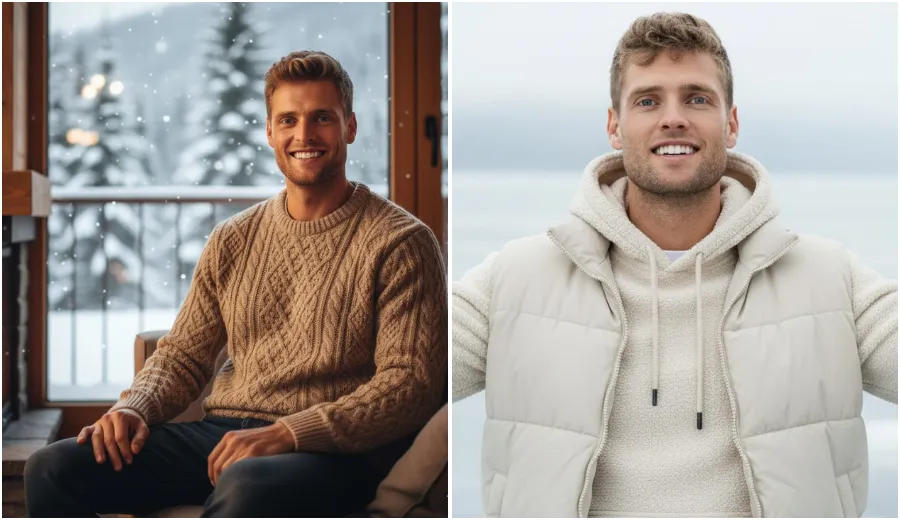
Transform my photo into a warm and cozy indoor winter scene. Maintain my original facial features and body build without any changes. Dress me in a premium beige cable-knit wool sweater with dark denim jeans. Place me sitting near a large glass window inside a luxury wooden mountain cabin. Outside the window, show blurred snow-covered pine trees. Use soft, warm lighting from a fireplace to create a natural glow on my skin. The final image should look like a professional indoor photoshoot with realistic textures and high detail.
3. Modern Techwear Snow Adventure Look
Apply a modern futuristic winter techwear style to my image. Keep my face, height, and proportions unchanged. Change my outfit to a high-tech waterproof white and grey parka with utility straps and detailed stitching. Place me in a heavy snowstorm with realistic snow and ice particles visible on my jacket. The background should show a blurred mountain peak. Use sharp focus, high contrast, and a professional adventure photography style similar to National Geographic, with hyper-realistic details and depth.
4. Classy Long Coat Winter Evening Style
Rewrite my photo into a sophisticated winter evening fashion look. Keep my face and body shape exactly the same. Dress me in a tailored charcoal grey wool overcoat with a dark winter scarf. The setting should be a European-style cobblestone street at night, lit by warm golden street lamps. The ground should appear wet from melted snow, creating natural reflections. The image should feel luxurious, cinematic, and magazine-worthy with deep shadows and crisp 8K clarity.
5. Golden Hour Snowy Forest Walk
Edit my photo to show me walking through a peaceful snowy forest during golden hour. Keep my facial features and physical structure unchanged. Change my outfit to a brown shearling aviator jacket with dark trousers. The sunlight should filter through snow-covered trees, creating a warm golden glow and soft lens flare. The snow must look soft and powdery. Use shallow depth of field for a professional portrait effect and ultra-realistic skin detailing.
6. Minimalist Nordic Winter Style
Recreate my photo with a clean and minimalist Nordic winter aesthetic. Keep my face and body frame identical to the original. Dress me in a premium cream-colored hoodie with a matching puffer vest. The background should be a simple, blurred frozen lake under a misty white sky. Use a bright, clean, and slightly desaturated color palette. Focus on high-resolution fabric textures and natural skin sharpness for a calm and modern winter look.
7. Neon City Winter Night Look
Transform my image into a vibrant winter night city scene with neon lights. Keep my face and body structure unchanged. Change my outfit to a stylish dark green bomber jacket with a winter beanie. Place me in a busy city square where colorful neon signs reflect on the snowy ground. Add realistic falling snow and slight motion blur in the background to show city movement. The final image should be ultra-realistic with sharp 8K details and cinematic lighting.
Final Thoughts Winter Photo Prompts
These winter special Gemini AI boys photo prompts allow you to turn a simple selfie into a professional-quality winter photoshoot without stepping outside your home. The real strength of Gemini AI, ChatGPT-powered prompt writing, and Nano Banana AI lies in the details. When you clearly describe lighting, clothing fabric, environment, and mood, the AI delivers results that look natural and realistic. If you want stylish winter photos for social media, personal branding, or creative experiments, these prompts are a powerful and easy solution.
