Prompts for Christmas Family Photo: Christmas photos always carry warm memories, and this year, AI tools like Gemini make it easier to turn a simple family picture into a beautiful holiday portrait. With the right prompt, you can keep your real faces and body shapes while changing the background, outfits, lighting and full scene. If you want professional-style Christmas portraits without a studio, these detailed prompts will help you create stunning, ultra-realistic 4K images. Want to see the complete list?
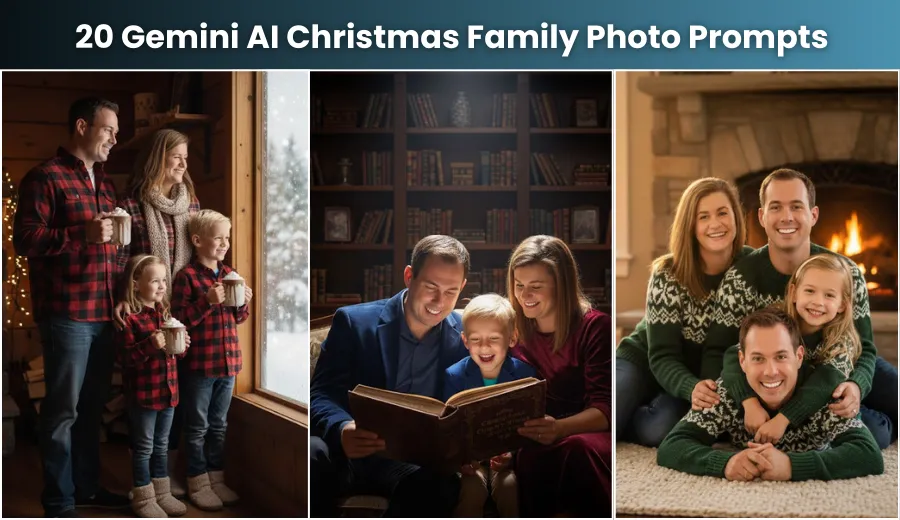
20 Gemini AI Christmas Family Photo Prompts
Cozy Indoor Christmas Scenes
1. Fireplace Warmth
Transform the image into an ultra-realistic family portrait sitting on a thick cream rug in front of a glowing stone fireplace. Everyone wears matching chunky knit sweaters in deep forest green and cream with dark denim jeans. Show a decorated Christmas tree with warm white lights in a classic American living room. Add a soft golden-hour glow through a window and create shallow depth of field for a professional 4K finish.
2. Hot Cocoa Window View
Edit the photo into a rustic cabin interior with the family standing near a large snow-covered window. Each person holds a mug of hot cocoa topped with whipped cream. Outfits include layered red and black plaid flannel shirts, wool scarves and soft slippers. Keep the room dim, highlight condensation on the glass and use cinematic HD realism for a cozy winter feel.
3. Tree Decorating Fun
Change the picture into a bright scene where the family is decorating a large Christmas tree. One person is reaching to place the star. Outfits include simple light T-shirts with festive red and white striped pajama pants. The background shows a modern living room with neatly wrapped gifts. Use HD realism, vibrant colors and clean lighting.
4. Reading a Christmas Story
Recreate the scene with the family close together on a large sofa, gathered around someone reading an old Christmas book. Outfits include rich velvet dresses and blazers in burgundy and midnight blue. The background has a wooden bookshelf and a spotlight focused on the group. Apply dark, moody realism with strong texture and depth.
5. Simple White Christmas Morning
Turn the photo into an elegant, minimal Christmas morning setup. The family stands near a white wall with a small wreath above a clean mantle. Outfits include white button-down shirts and light gray pants or skirts. Keep the pose natural and create a bright high-key look with soft daylight from the front.
Charming Outdoor Adventures
6. Snow-Covered Pine Forest
Transform the picture into a peaceful family walk through a deep pine forest after fresh snowfall. Everyone wears matching navy puffer jackets, colorful knitted beanies and gloves. Snow dust covers tall pine trees in the background. Use cold, crisp realism to enhance snow texture and winter air.
7. Festive Street Market
Edit the image to place the family in a busy US Christmas street market. Include food stalls, warm lights and rising steam from hot drinks. Outfits include wool coats in camel, gray and black with leather gloves. Use bokeh-style realism to blur the background while keeping the family sharp.
8. Cutting the Christmas Tree
Recreate the photo on a snowy tree farm next to a freshly cut pine tree. One person lightly holds an old-style axe for effect. Outfits include denim overalls, plaid shirts and brown leather boots. Show small pine trees across an open field with light overcast skies. Use detailed earthy realism.
9. Sledding Hill Fun
Turn the scene into a lively moment at the base of a sledding hill. The family is laughing with a wooden sled nearby. Outfits include bright snow jackets in reds, yellows and blues. Show a wide snowy field in the background. Add an action-style realism filter for movement and flying snowflakes.
10. Grand Entrance Photo
Change the picture into a formal family portrait on the snow-covered steps of a historic American house. Outfits include tuxedos and long gowns in black, gold and silver. Add wreaths and garlands lit with white lights. Use dramatic night-time lighting for strong highlights and shadows.
Playful and Themed Concepts
11. Elves in the Workshop
Recreate the scene inside a bright North Pole toy workshop. The family acts as Santa’s elves working on toys. Outfits include classic elf costumes with striped stockings, pointed hats and detailed accessories. Fill the background with wooden toys and tools. Use storybook realism with rich details.
12. Gift Wrapping Mess
Edit the image into a fun, chaotic room filled with wrapping paper, tape and ribbon. The family is sitting on the floor looking amused. Outfits include Christmas-themed graphic T-shirts and sweatpants. Add crushed paper and discarded bows across the floor. Use natural indoor realism focused on candid expressions.
13. Gingerbread House Builders
Transform the photo into a scene where the family gathers around a table building a large gingerbread house. Outfits include light aprons over everyday clothes. Show icing, candy and gingerbread pieces across the table. Use macro-style detail for sugary textures and frosting.
14. Caroling Under a Lamppost
Generate a scene of the family singing under an old-style gas lamppost in a snowy neighborhood. Each person holds a songbook. Outfits include vintage capes or coats in deep reds and greens, along with mufflers and hats. Use warm lamppost lighting and cinematic realism.
15. Ugly Sweater Competition
Recreate the image as a playful pose featuring bold, detailed ugly Christmas sweaters with large 3D decorations and lights. Keep the background simple, like a holiday party setup with soft blur. Use high-detail realism to make the textures and decorations sharp.
Elegant and Classic Poses
16. Formal Red and Gold Portrait
Change the photo into a polished family portrait with everyone facing the camera. Outfits include velvet dresses, jackets and ties in rich red and gold. Use a deep navy curtain backdrop and strong studio lighting for a clean, luxurious effect.
17. Black and White Timelessness
Edit the image into a high-contrast black-and-white portrait. The family leans casually on a wooden railing. Outfits include fitted turtlenecks, blazers and dark trousers. The background shows a blurred winter street. Use dramatic monochrome realism emphasizing shadows and texture.
18. Gilded Age Dining Room
Transform the photo into a historical scene in a grand dining room decorated with antique furniture and art. Outfits include vintage brocade dresses and vests in jewel tones. Add crystal glasses, fine china and warm candle-like lighting for a rich, elegant look.
19. New Year’s Eve Countdown
Create an energetic New Year’s Eve scene with confetti falling and the family cheering. Outfits include sparkling metallic dresses and shirts in silver and champagne tones. The background shows party lights and reflective surfaces. Use a bright, reflective realism filter.
20. Simple Garland Archway
Convert the picture into a clean, elegant photo under a cedar garland archway decorated with red bows. Outfits include matching dark denim jeans and soft light-gray long-sleeve shirts. Use soft daylight for a gentle, welcoming atmosphere.
Conclusion
Detailed prompts help AI tools like Gemini create sharp, ultra-realistic holiday photos by guiding the background, lighting, clothing and textures. With the right instructions, you can turn a regular family image into a high-quality Christmas portrait that feels professional and personal. These rewritten prompts are designed to keep your family’s real features intact while giving you a beautifully crafted holiday scene in 4K quality.
